
Machines, Post-Processors, G-Code & Bridge
Configure machine profiles, choose or import .pp post-processors, save single or multi-file G-code, stream directly over LAN with VibeCNC Bridge, and review plan limits.
Every CNC controller speaks its own slight dialect of G-code. Picking the right machine profile and post-processor once ensures every file you export starts, runs, and parks cleanly.
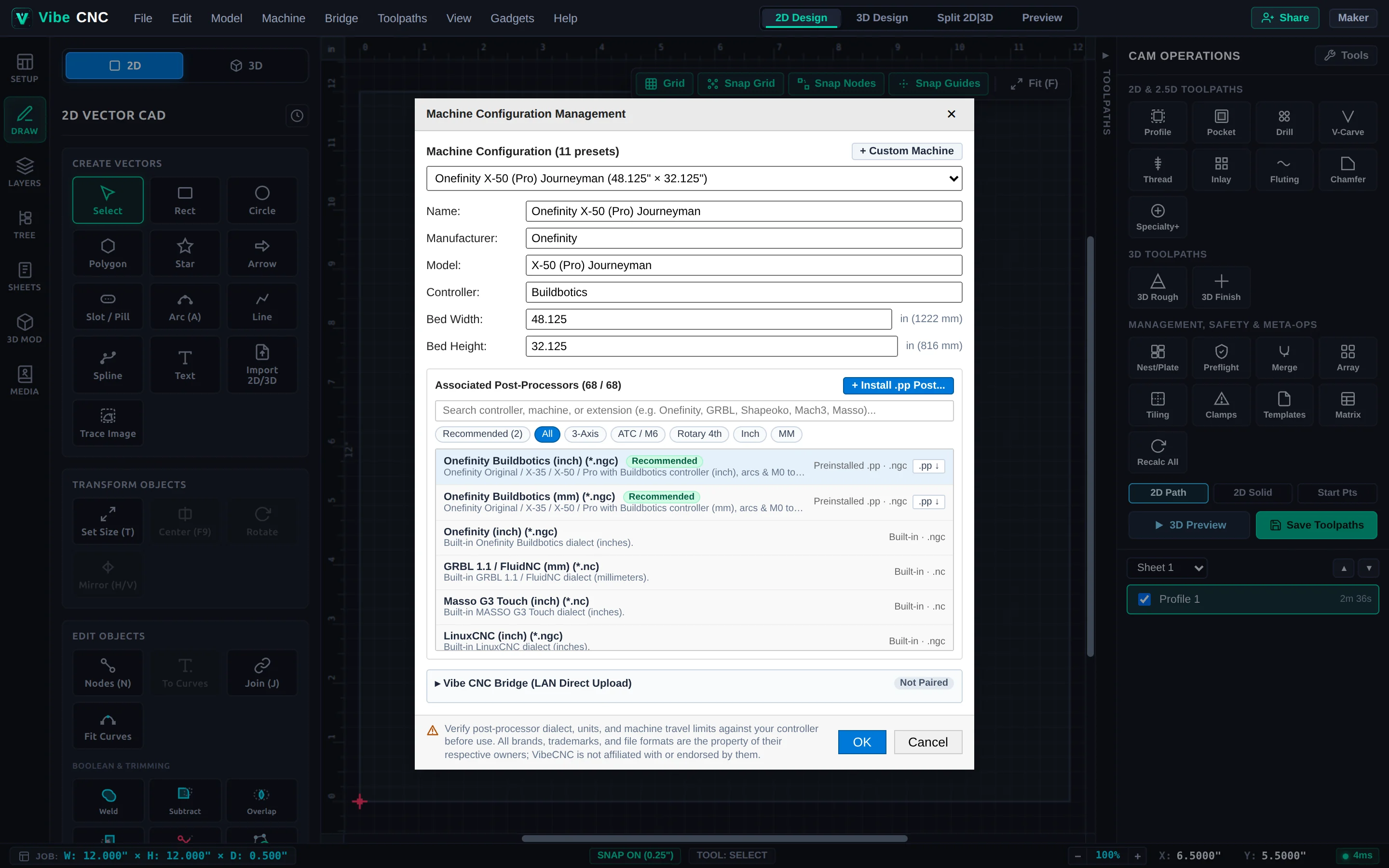
Machine Configuration & Post-Processors
Open Machine > Machine Configuration to pick a preset (Onefinity X-50 Journeyman, Shapeoko, Masso G3, GRBL/FluidNC, LinuxCNC, Mach3/4) or click + Custom Machine to enter your exact bed Width/Height, rapid speeds, and acceleration.
- Built-In & Preinstalled Post-Processors: Filter by 3-Axis, ATC / M6, Rotary 4th, Inch, or MM.
- Custom
.ppImport: Click + Install .pp Post... to load your own custom post-processor file. - Native Circular Arcs: Arcs created in CAD or via Fit Curves output clean
G02/G03 I Jarcs whenever supported by your post.
Saving Toolpath Files
Click Save Toolpaths in the Right Drawer and choose the output mode that matches your shop workflow:
- Selected Toolpath: Exports only the highlighted operation.
- Visible Toolpaths to Multiple Files: Outputs numbered files per toolpath (recommended when changing bits manually without a tool setter).
- Visible Toolpaths to One File (Group Where Possible): Combines consecutive operations using the same bit into one file, or outputs a single multi-tool program when your machine supports
M6ATC / manual tool changes.
VibeCNC Bridge (Direct LAN Machine Streaming)
Open the Bridge menu in the top header to pair VibeCNC with your local shop network. Upload G-code directly to Onefinity (Buildbotics), FluidNC, GRBL senders, OctoPrint, or Masso controllers without shuffling USB sticks.
Plans & Export Limits
All 2D and 3D CAD design, modeling, toolpath calculation, and 3D simulation run free in the browser at any size. Server-side G-code export and cloud storage scale by plan:
| Capability | Hobbyist (Free, Verified Email) | Creator | Pro |
|---|---|---|---|
| 2D & 3D Design + Simulation | Unlimited size | Unlimited size | Unlimited size |
| 2D G-Code Export | Up to 18" x 18" (457.2 mm) | Unlimited size | Unlimited size |
| 3D G-Code Export | Up to 12" x 12" (304.8 mm) | Unlimited size | Unlimited size |
| Local Project Save (.vibecnc, .svg, .dxf) | Included (any size) | Included (any size) | Included (any size) |
| Cloud Storage | 500 MB | 30 GB | 70 GB |
| 3D Model & Image Credits / mo | 1 each | 5 each | 12 each |