
2D and 3D CNC design and CAM right in your browser
Draw vectors, sculpt 3D reliefs, preview your cuts in real wood grain, and generate shop-ready G-code on Windows, macOS, or Linux. No $2,000 upfront license and no Windows-only installs.
Hobbyist tier is free forever (up to 18" x 18" 2D and 12" x 12" 3D G-code). Paid plans start at $5/mo billed annually.
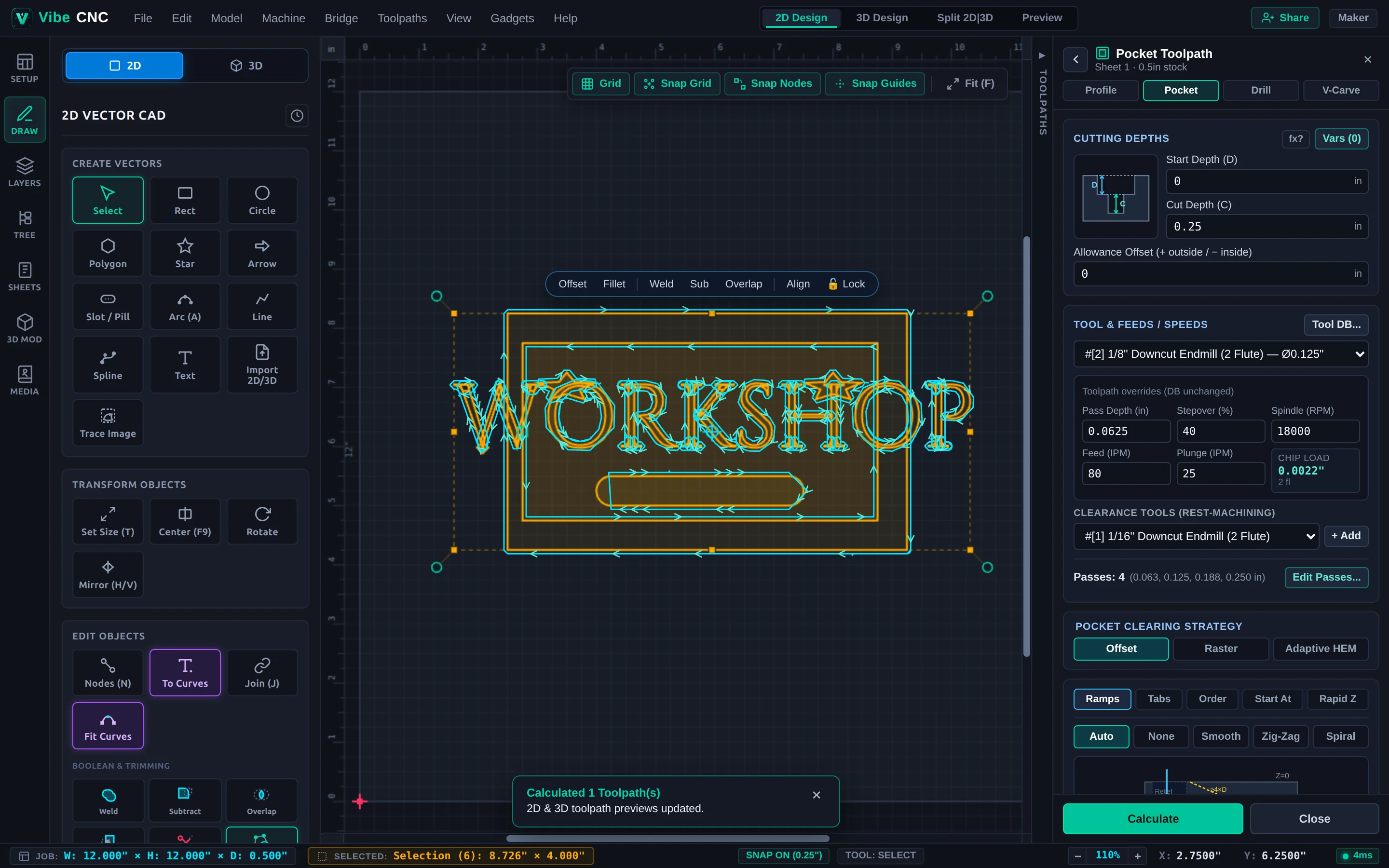
Built for actual shop cuts, not just pretty mockups
Most web CAD tools stop at basic 2D cutouts. VibeCNC gives you fast, full-featured 2D and 3D CAD/CAM right in your browser, built with the shop-floor safety habits experienced CNC operators expect.
Smart toolpaths that go easy on your bits
End mills are made to cut sideways, not drill straight down into hardwood. VibeCNC tracks the material removed by earlier passes and enters laterally from cleared pockets whenever possible, or ramps in gently at 4x bit diameter so you get cleaner edges and longer bit life.
- Full 2D & 2.5D suite: Profile, Pocket, Adaptive HEM clearing, Peck Drilling, V-Carve, Prism, Chamfer, Fluting, Keyholes, Thread Milling, and T-Slot/Dovetail undercuts.
- Visual V-Carve Inlays: Built-in cross-section preview for plug depth, glue gap, and saw kerf so both halves seat tight.
- Clamp keep-out zones: Mark hold-down clamps on your spoilboard so rapid moves retract safely above them.
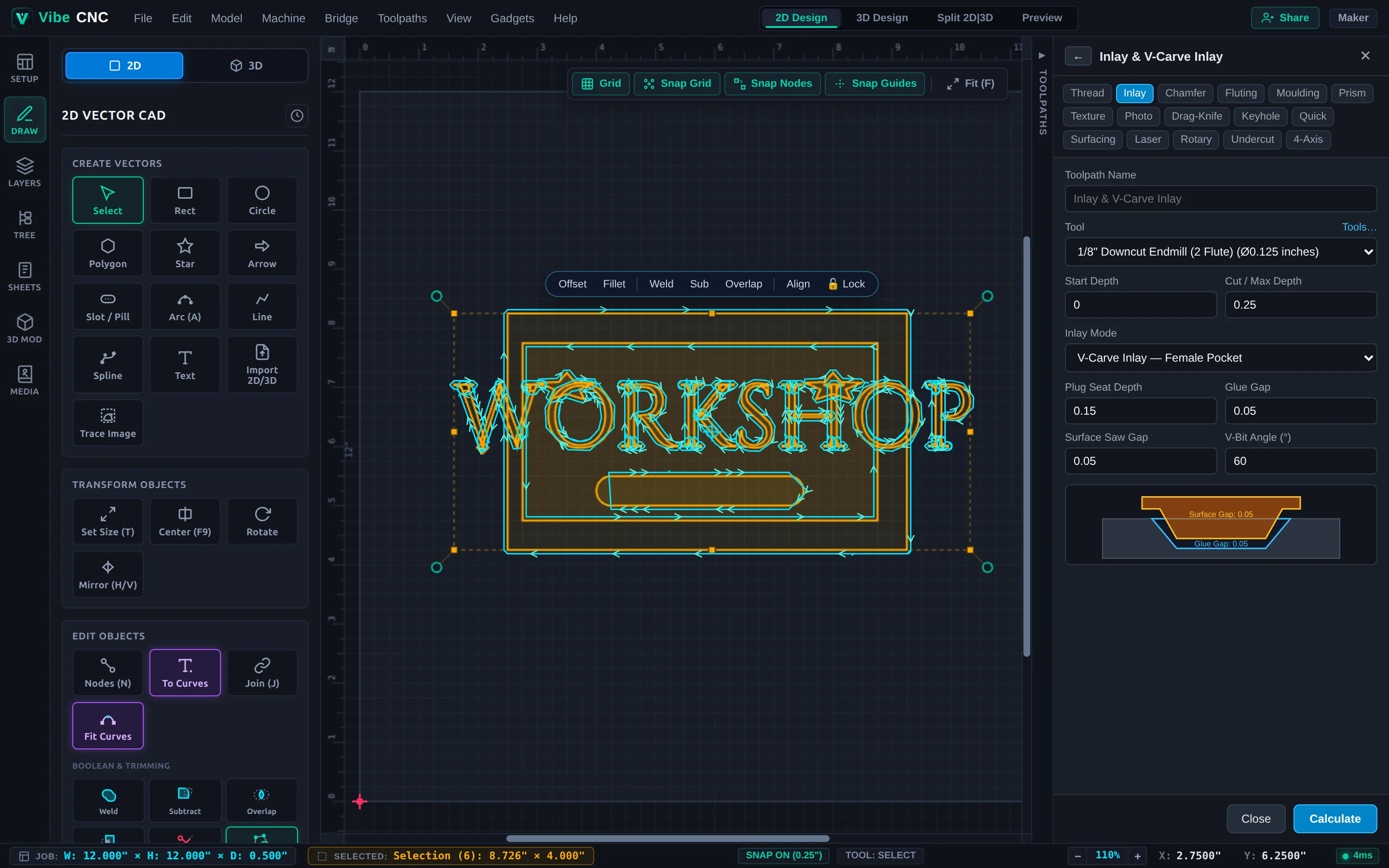
2D design, 3D relief modeling, and side-by-side simulation
Switch between 2D vectors, 3D modeling, and split 2D/3D view with a single keystroke. Fix broken SVGs with Vector Doctor, weld script fonts automatically, add dog-bone fillets for plywood joinery, or sculpt and project onto 3D reliefs.
- 1,960+ fonts built in: Offline TrueType fonts plus custom .ttf, .otf, .woff, and .vfont uploads with live previews.
- Parametric CAD: Named Document Variables, math formulas in every depth box, non-destructive live modifiers, and a 2D constraint solver.
- 3D roughing, finishing & simulation: Watch the virtual cutter remove material from your chosen wood species before you touch a real board.
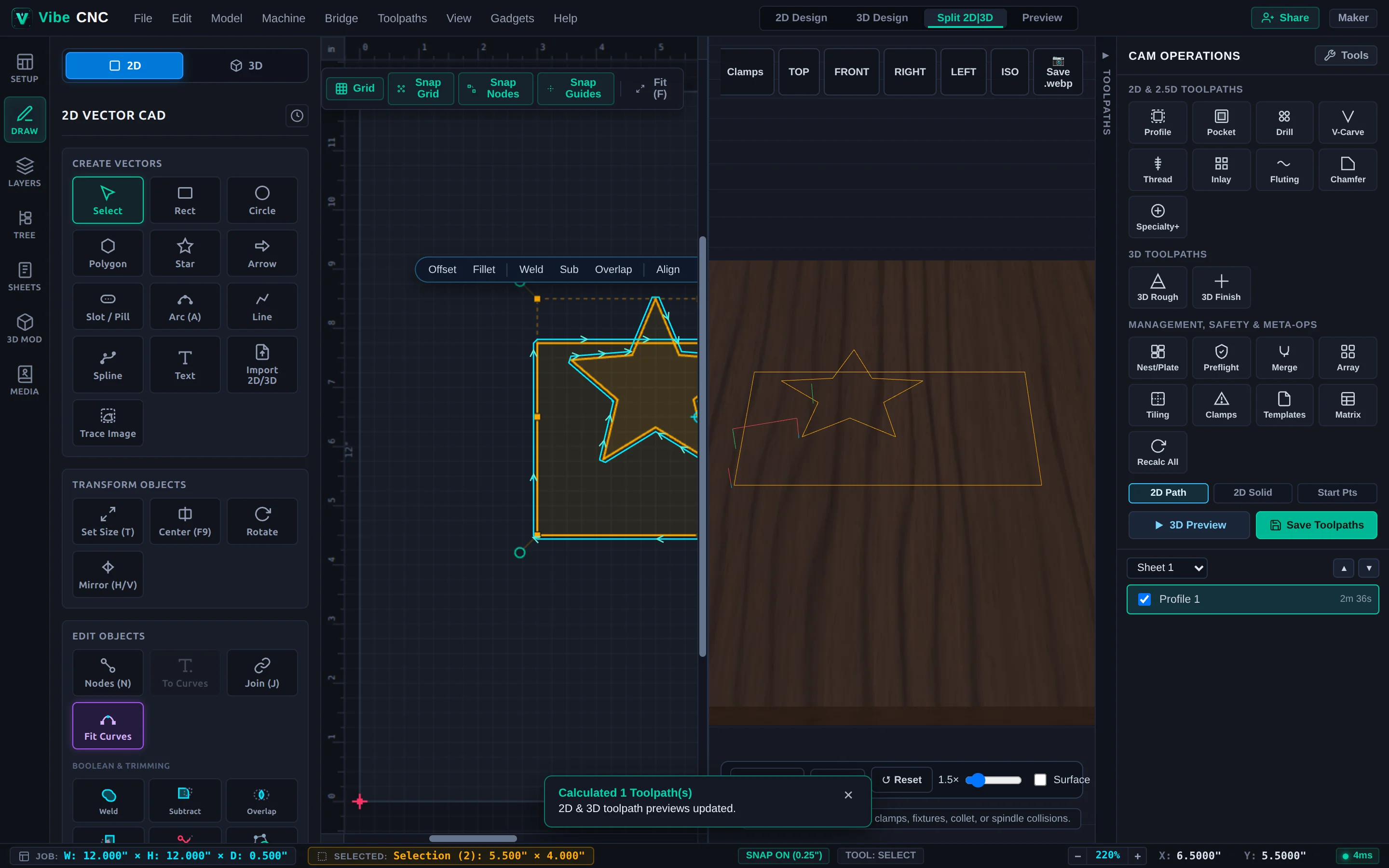
3D relief creation and built-in VibeCNC Assistant
Need a custom relief plaque, medallion, or quick repetitive layout? Import STL, OBJ, or STEP files, sculpt reliefs directly in the 3D drawer, or use the built-in VibeCNC Assistant to draft shapes, reliefs, and toolpaths with explicit step-by-step confirmation before anything cuts.
- Two-sided & rotary jobs: Flip-jig alignment dowels for bowls and trays, plus 3+1 indexing and simultaneous 4th-axis rotary machining.
- Multi-sheet & tiling: Nest parts across multiple plywood sheets or tile oversized signs on a smaller CNC bed.
- Live 3D proofs: Share an interactive 3D preview of a custom sign or plaque with a client before buying lumber.
- 187 languages built in: Automatically adapts to your browser language, or switch anytime from the menu.
Materials, bit libraries, and post-processors ready to go
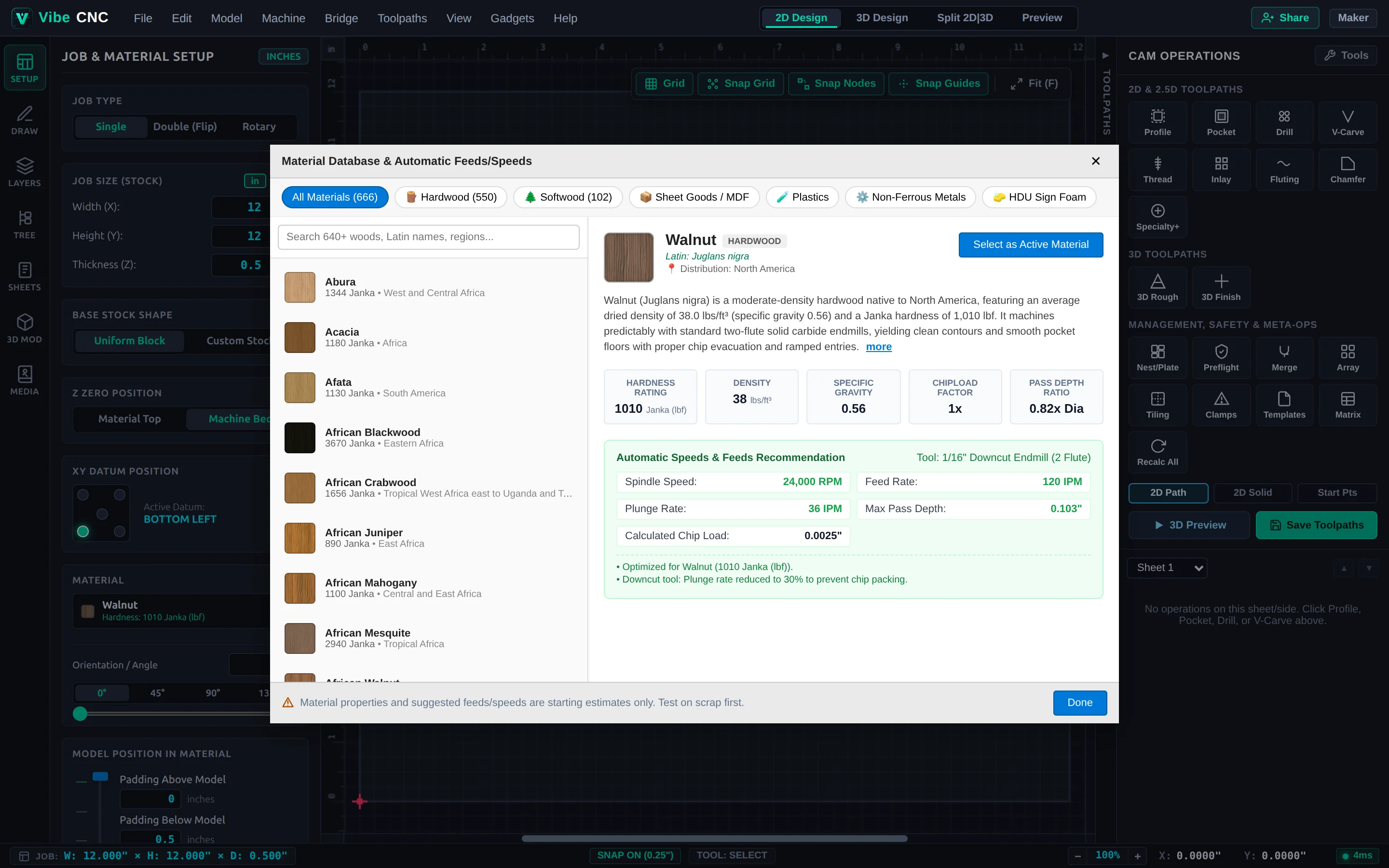
Pick walnut, hard maple, Baltic birch, HDPE, or 6061 aluminum from the material database to get realistic 3D grain and starter chip-load numbers. Pair your machine profile once and export clean G-code, or send files directly across your shop Wi-Fi with VibeCNC Bridge.
- 640+ wood species & sheet goods: Includes Janka hardness, density, and machinability notes so you have a sensible starting point.
- Per-toolpath overrides: Tweak pass depth, RPM, or feed rate on one cut without messing up your master bit library.
- Direct LAN transfer: Send G-code straight to Onefinity Buildbotics, FluidNC, GRBL senders, OctoPrint, or Masso over your local network.
Bring your existing files and machines with you
Switching CAD/CAM tools should not mean redrawing years of shop jigs or rebuilding your bit library from scratch. You can import common CAD formats and save local project files on every plan, including the free Hobbyist tier.
2D & 3D Design Imports
Open standard vector art, mechanical parts, and 3D meshes directly in the browser.
Existing Shop Libraries
Import legacy CNC job files, tool databases, engraving fonts, and custom post-processors.
Controllers & Exports
Save local .vibecnc projects, .svg/.dxf vectors, and controller-specific G-code files.
Compatibility note: Third-party machine names, controller names, tool catalogs, and file extensions (.crv, .vtdb, .vfont, .pp, .dxf) are referenced strictly for file and hardware compatibility. VibeCNC and Orso LLC are independent and are not affiliated with or endorsed by Vectric Ltd., Autodesk, or any machine or cutter manufacturer.
Straightforward pricing, no surprise paywalls
Design, simulate in 3D, and save local project files at any size for free. Upgrade only when you want unlimited G-code output dimensions, larger cloud storage, and higher monthly 3D model allowances.
Hobbyist
$0 / month
Unlimited browser design, 3D simulation, and local .vibecnc / .svg / .dxf saves. Verified accounts get 2D G-code up to 18" x 18", 3D G-code up to 12" x 12", 500 MB cloud storage, and 1 monthly 3D model & image credit.
Compare all Hobbyist limits →Creator
$5 / mo billed annually ($60/yr) or $7/mo monthly
Unlimited 2D and 3D G-code dimensions for full 4' x 8' sheets and large reliefs, 30 GB cloud storage, 5 monthly 3D model generations, and 5 monthly image credits.
See Creator plan details →Pro
$10 / mo billed annually ($120/yr) or $14/mo monthly
Everything in Creator with 70 GB cloud storage, 12 monthly 3D model generations, 12 monthly image credits, 1,000 daily Assistant turns, and priority email support.
See Pro plan details →Public manual and step-by-step project tutorials
Every feature in VibeCNC is documented openly so you can see exactly how toolpaths, feeds, inlays, and post-processors work before you ever spend a dollar.
Full Reference Manual
38 illustrated guides covering job setup, 2D node editing, Vector Doctor, parametric modifiers, 3D reliefs, smart toolpaths, and post-processors.
Browse Documentation →Hands-On CNC Projects
9 complete walkthroughs with real bit selections and depths: V-carved shop signs, dog-bone desk organizers, inlays, 3D reliefs, and two-sided bowls.
Explore Tutorials →Free CNC Calculators & Compatibility
Calculate chip load, feeds and speeds, and V-Carve inlay depths right in your browser, or check support for Onefinity, Shapeoko, LongMill, and GRBL.
Questions about your machine, billing, or a project?
Email us for help with post-processors, subscriptions, refunds, or shop feedback. We answer support emails within one business day.